See Fidelia in 50 seconds
A loyalty card in Apple Wallet and Google Wallet, added with a QR code and stamped from any phone.
English voice-over
What is a Wallet loyalty card?
It is your stamp card, stored in the wallet app your customers already use for boarding passes and concert tickets. Instead of a paper card that gets lost or forgotten, the card sits on their phone, shows their progress, and tells them when a reward is waiting.
Your shop’s name, logo and colour are on the card. Fidelia only appears in small print on the back.
How do customers add the card?
- They scan your QR code, on the stand on your counter or anywhere you print it.
- A page with your logo opens in their language, showing the reward (“10 stamps = a free coffee”).
- They type their first name and e-mail address, and can tick one optional box to receive your news.
- Their phone shows the right button: Add to Apple Wallet on an iPhone, Add to Google Wallet on Android. One tap and the card is in their wallet.
No app, no password, no account to create. Customers without a wallet app get a web card with the same QR code. If you turn on the welcome stamp, the card starts with its first stamp already filled in.
What happens at the counter?
- The customer shows the card on their phone.
- Your team opens the Fidelia scanner on any phone and scans the QR code on the card.
- The scanner shows a big +1, the customer’s first name and their progress (“Sarah · 4/10”).
- The card on the customer’s phone updates within seconds.
When the last stamp fills the card, it switches to a reward-ready layout and the customer gets a notification on the lock screen. Next visit, your team scans it, taps Claimed (or Claim + add today’s stamp), and the card starts again as card number two. Every completed card is kept in the history, so you can see who your most loyal customers are.
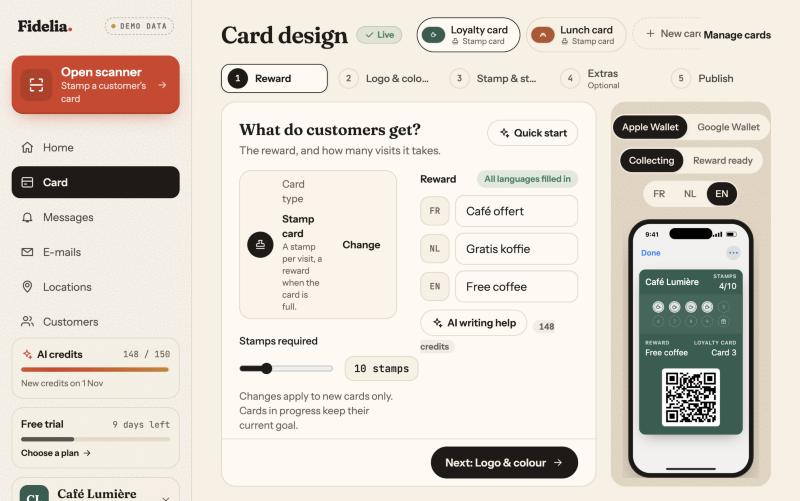
What can you design?
- The reward and the number of stamps, from 3 to 30.
- Your logo (cropped in the browser for Apple and Google) and one brand colour; text contrast is set automatically.
- The stamp: a coffee cup, burger, pizza slice, croissant, star, heart, scissors or tick, or your own picture.
- The style: three templates (classic, bold, minimal).
- Extras: a welcome stamp, and the minimum time between two stamps on the same card (5 minutes by default).
A live preview shows the Apple and the Google version side by side, in Swedish and English. The card is shown in the language of the customer’s phone.
What are the limits?
| Customers and stamps | Unlimited, on every plan |
| Stamps per card | 3 to 30 |
| Cards per customer | One per e-mail address and per card |
| Corrections logged with a reason | Owner or manager, in the dashboard |
| Card types on Essential | Stamp card (points, cashback, prepaid and membership cards are Pro) |
If you change the number of stamps later, cards that are already running keep their old rule until they are completed; the new rule applies from the next card.
Which plan includes it?
Every plan. Essential (299 kr a month excl. VAT) includes one stamp card in both wallets. Pro (599 kr) adds other card types, several cards, push notifications, reminders near your shop, e-mails and VIP levels, with a 14-day free trial.
Examples by trade
These are example set-ups, not customer stories:
- Café: 10 stamps for a free coffee, welcome stamp on, 5 minutes between stamps so a group order can’t fill a card at once.
- Bakery: 8 stamps for a free cinnamon bun, with a croissant as the stamp icon.
- Hairdresser: 6 stamps for a free cut or a treatment, with the scissors icon and no welcome stamp.
What if a customer deletes the card or changes phone?
The customer stays in your list with a Card deleted badge, and their stamps are kept. From their customer page you can show a QR code that lets them add the same card back, on an iPhone or an Android phone. If a customer asks to be erased, you can delete them: their card is deactivated in the wallet and their name and e-mail are removed.