See Fidelia in 50 seconds
A loyalty card in Apple Wallet and Google Wallet, added with a QR code and stamped from any phone.
English voice-over
What can you see on every plan?
The home screen of the dashboard, on Essential and Pro:
- stamps (or visits) today and this week,
- active customers over the last 30 days,
- the repeat rate: customers with two visits or more, out of those with at least one,
- rewards ready to be claimed,
- a week chart, Monday to Sunday, compared with last week,
- a live feed of what happens at the counter and your five most loyal customers,
- for other card types: points redeemed, cashback used, packs sold, top-ups, memberships expiring soon.
Everything is in your shop’s timezone and language.
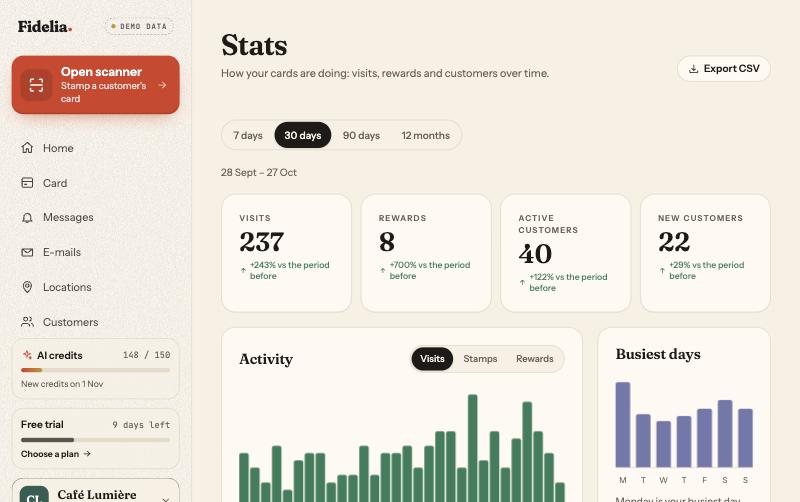
What does the Pro Stats page add?
- Periods: 7 days, 30 days (per day), 90 days (per week) and 12 months (per month).
- Four headline numbers, each compared with the previous period: visits, rewards, active customers, new customers.
- Activity chart, switchable between visits, stamps and rewards.
- New and returning customers per period, and the share of active customers who came back.
- Busiest days of the week.
- Per card: visits, stamps, rewards and active customers for each of your cards.
- Per location: visits, share and rewards for each address.
Undone actions and manager corrections are left out, so the numbers reflect real visits.
What can you export?
| File | From | Contains |
|---|---|---|
| Customers | Customers page | First name, e-mail, language, news consent, join date, card and type, wallet, progress, completed cards, points, balance, total spent, visits, level, member until, status, last activity |
| Transactions | Stats page, chosen period | Date, time, type, customer, card, location, staff member, stamps, amounts, points, balance change, visits, note, undone |
Files use the separators and number format of your language, with dates in your shop’s timezone. Only owners and managers can see stats and export.
Which plan includes it?
The home-screen figures are on every plan. The full Stats page and both CSV exports are Pro (€59 a month excl. VAT, 14-day free trial).
Examples by trade
Example uses, not customer stories:
- Café: compare busiest days before and after a “quiet afternoon” push notification.
- Gym or studio: export the customers file to see which memberships end next month.
- Restaurant: check the per-location table to see which branch brings the most returning guests.